
Drone Operations Software Features: What Growing Teams Actually Need
Every commercial drone team needs five drone operations software features: automatic flight logging, pilot qualification and currency tracking, aircraft and battery maintenance records, risk assessments and checklists linked to each job, and audit-ready reporting that includes occurrences. Everything beyond that depends on how big your team is and which regulator you answer to.
If you're writing a shortlist or a requirements list, treat those five as your baseline. This guide shows which extras earn their place at each team size, how the compliance features map to actual UK CAA, EASA and FAA record-keeping rules, and what to ask vendors before you sign anything.
At a Glance
- Flight logging: automatic, not typed in
- Pilots: qualifications and currency alerts
- Maintenance: aircraft and batteries
- Risk: assessments and checklists per job
- Reporting: occurrences and audit exports
The Five Features Every Commercial Team Needs
Start here. If a platform can't do these five well, the rest of its feature page doesn't matter.
Automatic flight logging
Logs should import from the aircraft or controller, not get typed in after the job. Manual entry works for about a month. Then someone forgets, and you've got a gap in your records you can't explain.
Pilot qualification and currency tracking
Certificates, authorisations, recurrent training and flying hours, all with expiry alerts. Once you have more than two pilots, nobody remembers who's current on what.
Maintenance and battery records
Per-aircraft hours, defects, repairs, firmware and configuration changes. Batteries need their own cycle counts, since they're usually the first component to let you down.
Job-linked risk assessments and checklists
A site assessment sitting in a shared drive isn't evidence. It needs to be attached to the flight it covers, timestamped, with the name of the pilot who completed it.
Audit-ready reporting, occurrences included
You should be able to pull the full record for one aircraft, one pilot or one job in minutes. That includes accidents and incidents, which every regulator covered below expects you to report.
Drone Management Software Checklist by Team Stage
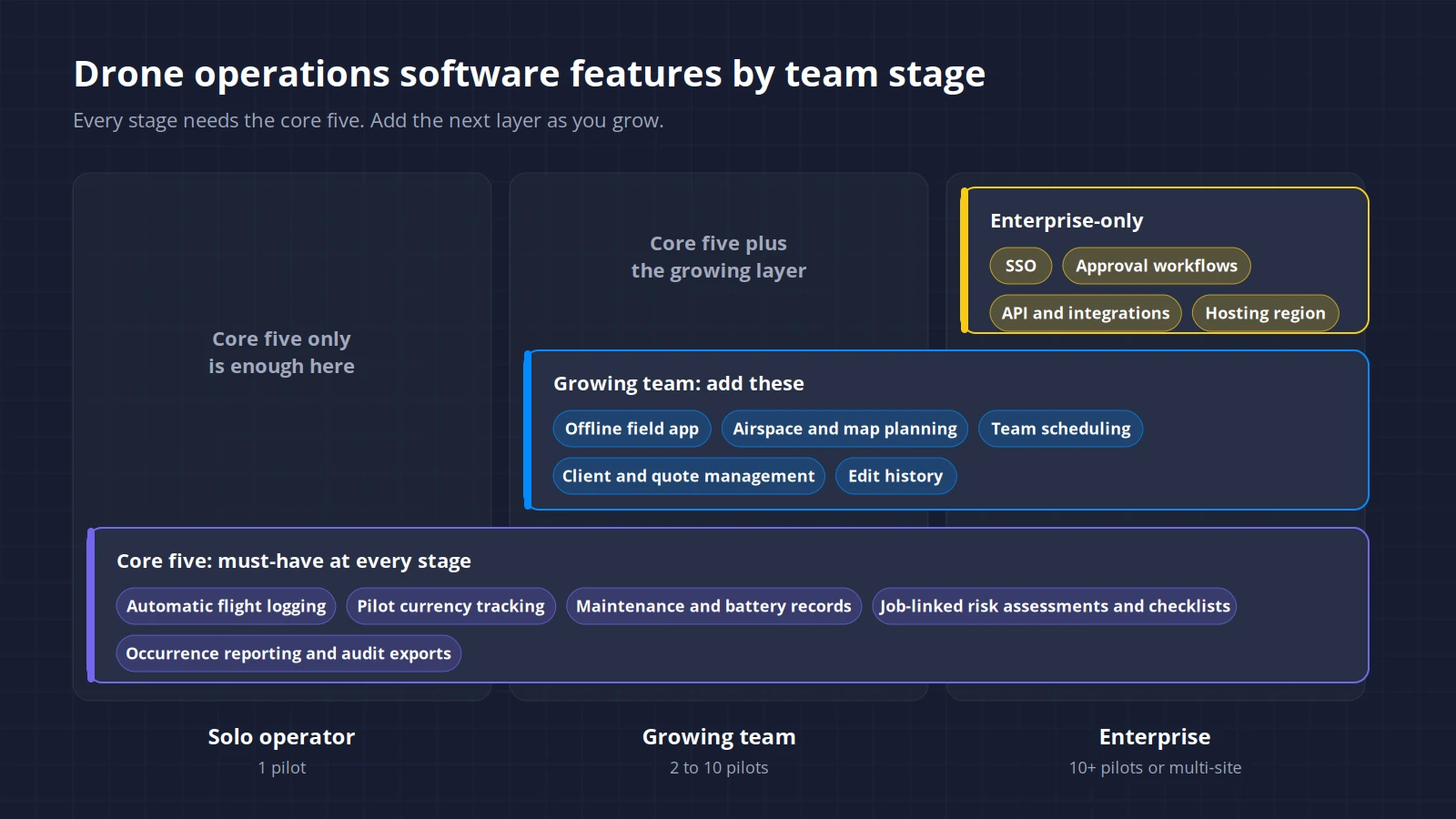
Not every feature pays for itself at every size. A solo operator paying for approval workflows is wasting money. An enterprise team without user permissions has an audit problem waiting to happen.
| Feature | Solo operator | Growing team (2 to 10 pilots) | Enterprise (10+ pilots or multi-site) |
|---|---|---|---|
| Automatic flight log import | Must-have | Must-have | Must-have |
| Pilot qualification and currency tracking | Must-have | Must-have | Must-have |
| Aircraft and battery maintenance records | Must-have | Must-have | Must-have |
| Job-linked risk assessments and checklists | Must-have | Must-have | Must-have |
| Occurrence reporting and audit exports | Must-have | Must-have | Must-have |
| Mobile app that works offline | Nice-to-have | Must-have | Must-have |
| Airspace and map-based job planning | Nice-to-have | Must-have | Must-have |
| Client, site and quote management | Nice-to-have | Must-have | Nice-to-have (often sits in a CRM) |
| Team scheduling and calendar | Not needed | Must-have | Must-have |
| User roles and permissions | Not needed | Nice-to-have | Must-have |
| Edit history on records | Nice-to-have | Must-have | Must-have |
| Approval workflows (flight sign-off) | Not needed | Not needed | Enterprise-only |
| Single sign-on (SSO) | Not needed | Not needed | Enterprise-only |
| API and integrations (ERP, GIS, asset systems) | Not needed | Not needed | Enterprise-only |
| Choice of data hosting region | Not needed | Not needed | Enterprise-only |
The biggest jump is from one pilot to three. A solo operator can hold most of the operation in their head. A team of three can't, and that's usually where spreadsheets start leaking.
Drone Fleet Software Requirements: Mapping Features to the Rules
Vendors love the word "compliant". Regulators don't certify software, though. The useful question is whether a platform captures the records the rules actually ask for. Here's what those are.
UK CAA
UK Regulation (EU) 2019/947, PDRA01, CAP 2606ASpecific category operations run under UK Regulation (EU) 2019/947. Point UAS.SPEC.050(1)(g) sets the operator's record-keeping duty, and UAS.SPEC.090 requires you to give the CAA access to those records. Breaching either is an offence under Article 265A of the Air Navigation Order 2016.
For PDRA01 holders, the CAA spells out the detail. You must keep up-to-date records of flight safety documents and the qualifications and training of your pilots, plus anyone with operational or maintenance duties. Those records must be kept for at least three years.
You also need an aircraft technical logbook for every aircraft. It covers each flight's date, time, duration, locations and pilot, total hours and cycles, pre-flight inspections, site risk assessments and RF surveys, and maintenance, defects and configuration changes. The CAA says it should be digital and easy to hand over for oversight, and publishes a template as CAP 2606A. Note that the technical logbook is separate from each pilot's own flight log.
Accidents, serious incidents and other occurrences must be reported under Article 19 of the same regulation, with the CAA's occurrence reporting guidance set out in CAP 382.
Software implication: separate aircraft and pilot logs, at least three years of retention, and exports in a format the CAA can actually use.
EASA
Regulation (EU) 2019/947, Regulation (EU) No 376/2014EASA member states apply the original Regulation (EU) 2019/947, so the same points apply: UAS.SPEC.050(1)(g) for records and UAS.SPEC.090 for access. The operational authorisation template in EASA's AMC and GM to Part-UAS includes a "records to be kept" section, which means your national authority can add conditions of its own. Occurrence reporting runs through Article 19 and Regulation (EU) No 376/2014.
Software implication: configurable record fields. Two authorisations from two national authorities won't ask for identical things, so cross-border operators need flexibility here.
FAA Part 107 and Part 108
14 CFR Part 107, Part 108 NPRM (90 FR 38212)Part 107 is lighter on paperwork. It doesn't mandate a flight log. But there are still records that matter:
- §107.7 requires you to present your remote pilot certificate and any other required records when the FAA asks.
- §107.9 requires a safety event report within 10 calendar days if a flight causes serious injury, loss of consciousness, or damage to property (other than the drone) above $500.
- §107.65 requires recurrent training within the previous 24 calendar months before you exercise pilot privileges.
Waivers issued under §107.205 often come with record-keeping conditions of their own, so check yours.
Part 108, the proposed BVLOS rule, isn't law yet. The NPRM was published in the Federal Register on 7 August 2025 (90 FR 38212), and the final rule has been under OIRA review since 10 July 2026. As proposed, it includes personnel training (§108.315), duty and rest limits (§108.330), and maintenance and battery requirements (§108.610 and §108.620). Treat those as direction of travel, and expect the final text to differ.
Software implication: recurrent training alerts, a fast way to pull incident details, and room for duty-time and maintenance records if BVLOS is on your roadmap.
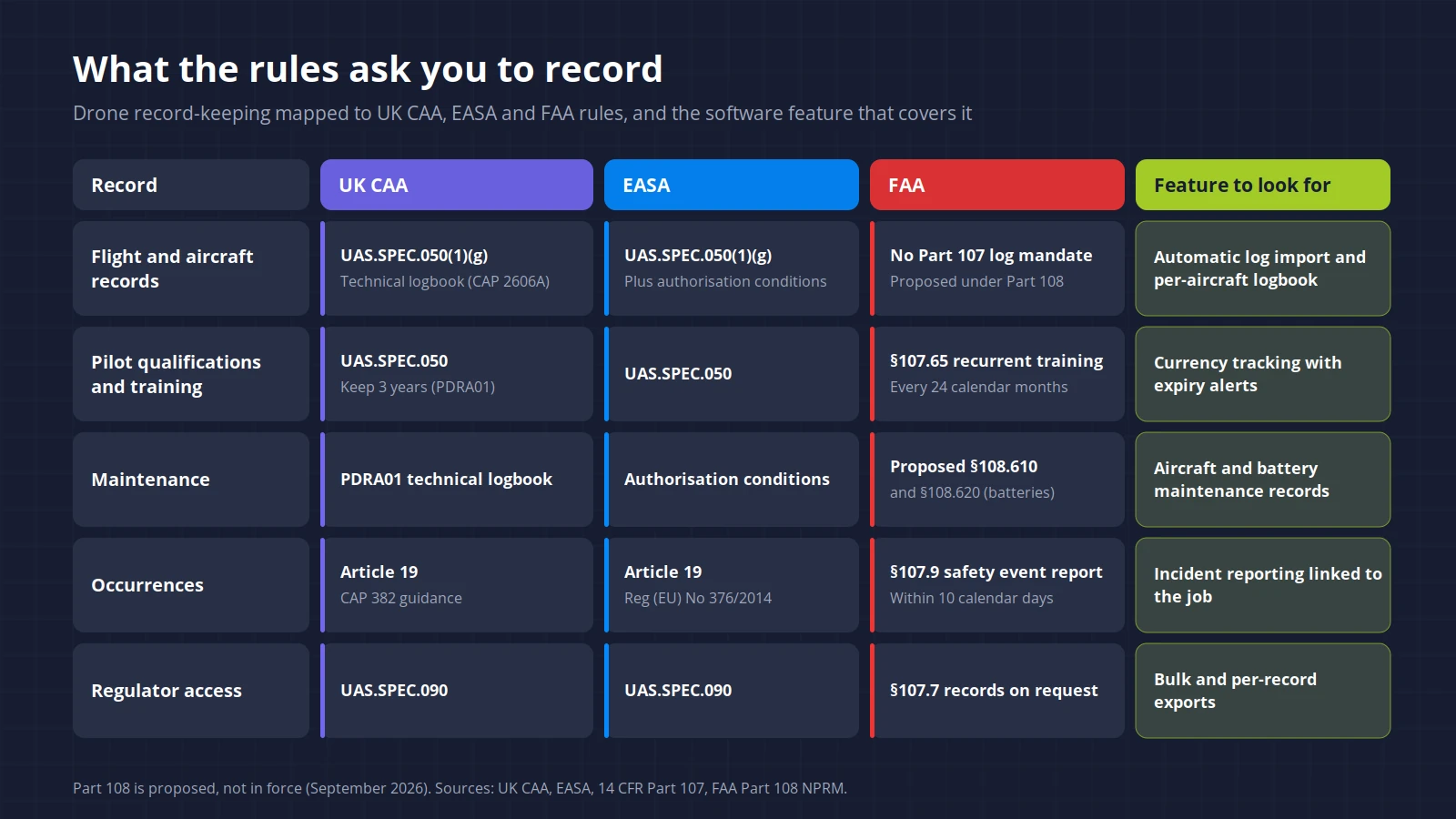
Summary: Records, Rules and the Feature to Look For
| Record | UK CAA | EASA | FAA | Feature to look for |
|---|---|---|---|---|
| Flight and aircraft records | UAS.SPEC.050(1)(g), PDRA01 technical logbook (CAP 2606A) | UAS.SPEC.050(1)(g), plus authorisation conditions | Not mandated under Part 107, proposed under Part 108 | Automatic log import, per-aircraft logbook |
| Pilot qualifications and training | UAS.SPEC.050, 3-year retention (PDRA01) | UAS.SPEC.050 | §107.65 recurrent training | Currency tracking with alerts |
| Maintenance | PDRA01 technical logbook | Authorisation conditions | Proposed §108.610 and §108.620 | Aircraft and battery maintenance records |
| Occurrences | Article 19, CAP 382 | Article 19, Regulation (EU) No 376/2014 | §107.9, within 10 calendar days | Incident reporting workflow |
| Regulator access | UAS.SPEC.090 | UAS.SPEC.090 | §107.7 | Bulk and per-record exports |
10 Questions to Ask Vendors in a Demo
Bring your own data. A demo on sample data shows you the vendor's best case, not yours.
- Can you import a flight log from one of our aircraft, live, right now?
- Where's the technical logbook for a single aircraft, and can I export it in a format a regulator can open?
- How do pilot currency alerts work, and who gets notified when something's about to expire?
- Show me a risk assessment attached to a completed job. If someone edits it after the flight, is that change logged?
- What does an occurrence record capture, and is it enough to file a CAA or FAA report from?
- How long do you keep our records, and what happens to them if we cancel?
- Can we bulk export everything (logs, assessments, maintenance, pilot records) in open formats like CSV?
- Where is our data hosted, and how do you handle pilot personal data under UK GDPR or GDPR?
- How does the price change when we add pilots, aircraft or sites?
- What does the mobile app do on a site with no signal?
Before the Demo
Send the list in advance. A vendor who answers in writing, before the call, is usually one who'll answer support tickets too.
Red Flags When Evaluating Platforms
A few warning signs we see often.
"Fully compliant" with no rule named
Ask which rule. If the answer is vague, the feature probably is too.
Manual-only flight logging
It'll be accurate for a few weeks, then it won't.
PDF-only exports
Fine for an auditor, useless if you ever want to move platforms.
Records editable with no history
An assessment changed after an incident, with no trace, is worse than no assessment at all.
Built for one regulator
A US-first platform can work in the UK, but you'll end up building CAA-shaped paperwork around it (and the reverse is true).
Maintenance tracking only on the top tier
It's a baseline feature, not a premium one.
No price until a sales call
Sometimes that's reasonable for enterprise. For a team of four, it usually means pricing that's hard to predict.
Turning This Into a Requirements List
Four steps from reading this to a usable shortlist.
Trim the team stage table
Delete the rows you don't need today, but keep the ones you'll need within a year.
Add your regulator
Fill in a column from the summary table above, so every requirement ties back to a rule.
Shortlist three platforms
Send each one the 10 demo questions before the call.
Trial the best two with real jobs
Run two real jobs on each, and get a pilot who wasn't part of the buying decision to use the field app.
Frequently Asked Questions
Common questions about drone operations software features
Sources
- UK CAA, PDRA01 UAS Operator responsibilities
- UK CAA, CAP 2606A PDRA01 UAS Operator Technical Logbook Template
- UK Regulation (EU) 2019/947, UAS.SPEC.050 Responsibilities of the UAS operator
- Air Navigation Order 2016, Article 265A
- Commission Implementing Regulation (EU) 2019/947
- 14 CFR Part 107 (§107.7, §107.9, §107.65)
- FAA Part 108 NPRM, 90 FR 38212, Docket FAA-2025-1908
Less Admin, More Flying
You got into drones to fly and deliver great work for clients, not to drown in paperwork and compliance admin. If Dronedesk makes your shortlist, try it free for days, run your next real job through it, and compare it against whatever else made the cut.
-day free trial. Cancel in-app anytime.