
DJI Remote ID Compliance Checks When Renting Aircraft
A hired drone’s model name is not enough to establish DJI Remote ID compliance. The aircraft’s regional variant, firmware, identification settings and any external module all need checking against the requirements for your operation. A supplier’s assurance that it is “Remote ID ready” leaves too much unanswered.
For survey teams, utilities and emergency services, the practical approach is to make Remote ID part of rental acceptance. Agree the evidence before booking, check the delivered equipment and resolve discrepancies before releasing it for operational use.
Start with the country of operation
Use the destination’s aviation authority, not the location of the rental company, as your starting point. Equipment hired domestically may be destined for an overseas assignment, while an imported aircraft may have a different configuration from the locally supplied version.
This guide provides an equipment acceptance process, not a live determination of national requirements, exemptions or model approvals. Establish those through the relevant official guidance before each hire.
| Destination | Official starting point | Question to settle before booking |
|---|---|---|
| United States | FAA Remote ID guidance | Which compliance route applies to this aircraft and operation? |
| European Union | EASA’s explanation of European drone regulations | What do the aircraft class, operating category and destination authority require? |
| United Kingdom | CAA drone guidance | Which current requirements and commencement dates apply to the proposed flight? |
Define the DJI Remote ID compliance evidence before booking
Ask the supplier to identify the actual aircraft being reserved. A quotation for “a Mavic” or “an equivalent enterprise drone” does not establish which hardware, software or identification system will arrive.
Your booking request should specify the evidence needed at handover:
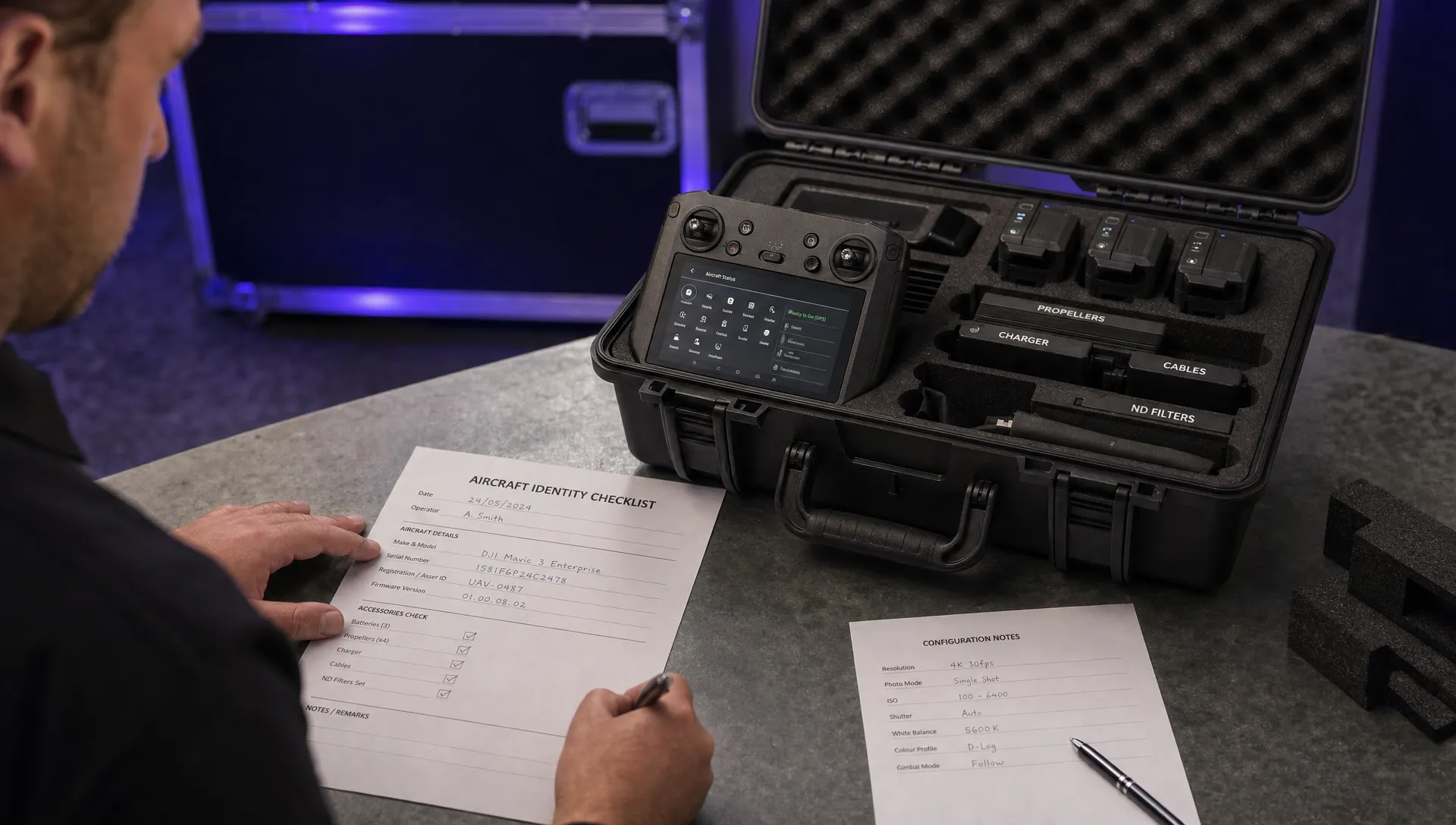
- Aircraft identity: Exact model, regional variant, aircraft serial number and photographs of relevant labels.
- Identification system: Whether the package uses built-in Remote ID or a separate broadcast module, with the relevant identifier recorded.
- Software configuration: Aircraft firmware, controller firmware and operating app versions.
- Supporting documents: Applicable manufacturer instructions and any conformity or acceptance records needed for the destination.
- Handover test: Agreement that you can power up the delivered package and inspect its Remote ID status before acceptance.
Also agree what happens if the supplier substitutes another aircraft. A replacement with the same commercial name should still pass the identity and configuration checks. Treat its identifiers and supporting evidence as a new acceptance record.
Set a deadline for receiving the documents. Discovering a missing identifier at the depot is inconvenient; discovering it at a remote inspection site can mean a lost working day.
The rental agreement should identify who provides a replacement, who authorises configuration changes and how a failed handover affects the hire. These are commercial arrangements to settle before collection, rather than assumptions to make afterwards.
Check the delivered model, not a generic compatibility list
For DJI Remote ID compliance, a compatibility list is a starting point, not evidence that the aircraft in your case is correctly configured. Model names alone do not establish regional settings, installed firmware or acceptance under a particular authority’s system.
Use DJI’s official support resources for the exact model’s manual and release notes. Record the document or release version you relied on, rather than keeping only a screenshot of a search result.
The following matrix identifies useful rental checks. It does not certify the current support or approval status of any listed model.
| Rental package | Evidence to request | Handover issue to watch for |
|---|---|---|
| DJI Air 3S or Mavic 4 Pro | Exact model and regional version, relevant instructions and installed firmware | Assuming one model’s instructions apply to the other |
| DJI Mavic 3 Enterprise or Thermal | Exact aircraft variant, operating app version and identification details | Treating the wider Mavic 3 family as one configuration |
| DJI Matrice 350 RTK | Aircraft and controller versions, identification details and intended payload configuration | Testing a different configuration from the one dispatched |
| DJI Inspire 3 | Aircraft identity, controller configuration and applicable manufacturer guidance | Accepting a demonstration using another aircraft |
| An aircraft supplied with an external module | Module make, model, identifier, mounting instructions and power arrangement | Receiving a loose module without an installed-system test |
Where the US compliance route requires a declaration of compliance, check the applicable entry through the FAA declaration database. Match the relevant product details rather than relying on a supplier’s statement that the brand is listed.
Keep aircraft serial numbers and Remote ID identifiers as separate fields until you have confirmed how the manufacturer defines them. They may be related, but copying the wrong string can undermine an otherwise careful handover.
Settle registration responsibilities separately
DJI Remote ID compliance checks should distinguish equipment identification from operator registration. A serial number describes equipment; an operator identifier describes a registered person or organisation. Do not assume that seeing either one proves the other has been handled correctly.
Before collection, ask who is responsible for each registration-related action under the destination’s rules. Where an identifier must be entered into the aircraft, establish whose identifier belongs there and who will enter it. An unfamiliar rental or cross-border arrangement is a reason to ask the authority, not improvise.
At handover, inspect any relevant configurable field using the manufacturer’s instructions. Check the saved value, not merely a number written on the rental paperwork. Follow the authority’s instructions for handling any confidential registration components, and avoid placing them in shared screenshots.
The rental company’s ownership of the aircraft does not answer every question about the intended operator’s responsibilities. Equally, do not create duplicate registrations simply because the aircraft is hired. Resolve the applicable process first.
Agree an off-hire procedure too. It should cover removal of renter-specific information where appropriate, release of account access and confirmation that the next customer will not inherit your settings. Do not factory-reset equipment without the owner’s agreement, since that may remove other configuration needed for the package.
Run a live check on the complete rental package
A useful DJI Remote ID compliance handover includes the equipment that will actually be deployed: aircraft, controller, operating app, payload and any external module. A supplier’s earlier test is useful background, but it cannot show whether something changed during packing, maintenance or substitution.
Choose a suitable location and follow the manufacturer’s start-up instructions. Allow the system to obtain the positioning information it needs and complete its checks. Do not turn a handover inspection into an unnecessary flight or operate motors in an unsuitable collection area.
Record the aircraft and controller firmware versions. Note the app name and version, such as DJI Fly or DJI Pilot 2 where applicable. Ask about recent updates, repairs, resets or controller replacements, then compare the delivered configuration with the documents received before booking.
Inspect the Remote ID status and any relevant identifier shown by the system. Photograph or capture the status in a way that ties it to the aircraft being accepted. A green status icon without an associated identity is weaker evidence than a documented check of both.
For a separate broadcast module, inspect its mounting, antenna clearance and power supply against its instructions. Check that the payload or case packing has not displaced it. Include module charging or power checks in the operating checklist, rather than relying on someone remembering them later.
Understand what a receiver test can prove
A receiving device can add useful evidence to a DJI Remote ID compliance check, but its limitations need recording. Receiving a transmission shows that the receiver detected something under those test conditions. It does not independently certify every requirement of the installed system.
Use a receiver or application compatible with the aircraft’s broadcast technology. Check the receiving device’s permissions and compatibility before interpreting an empty screen as an aircraft fault. Device hardware and software can affect what is detected.
Where practical, compare the received identifier with the aircraft or module record and inspect the other displayed information against the manufacturer’s expected output. Record the receiver used, test time and relevant conditions. Avoid collecting or retaining unrelated nearby aircraft information unnecessarily.
If the onboard system reports healthy status but your receiver detects nothing, investigate the mismatch. If a receiver detects the aircraft while its own system reports a fault, investigate that too. Neither result should simply cancel out the other.
Use clear hold points when a check fails
Set your dispatch policy before a problem occurs. Under that policy, unresolved identity, configuration or system-status issues should stop acceptance until someone with the appropriate authority has reviewed them.
The following are recommended rental acceptance decisions, not statements of regulatory remedies.
| Finding | What to check next | Rental acceptance decision |
|---|---|---|
| No Remote ID information appears where expected | Exact model instructions, app compatibility, firmware and configuration | Hold pending an explained and documented result |
| Aircraft or module identifier differs from the paperwork | Physical labels, app details and supplier asset records | Require corrected evidence or a replacement package |
| The system reports a Remote ID fault | Manufacturer’s troubleshooting procedure and supplier support | Do not release the package with an unresolved fault |
| An external module is missing or cannot be powered correctly | Agreed equipment specification and module instructions | Require a complete, tested installation |
| An unexpected replacement aircraft arrives | Identity, documents, settings and handover test | Repeat acceptance for the replacement |
Troubleshooting DJI Remote ID compliance is not a reason to make undocumented firmware changes at the collection desk. Obtain the owner’s approval, use manufacturer-supported procedures and leave enough time to repeat the checks afterwards.
Avoid experimental downgrades, unofficial workarounds or changes intended merely to remove a warning. A warning disappearing is not evidence that the underlying issue has been resolved.
If the package cannot be verified in time, arrange a replacement or revise the deployment. Supplier confidence and a successful motor start are not substitutes for the missing evidence.
Keep an acceptance record that another crew can understand
A DJI Remote ID compliance record should let another authorised team member understand what was checked without phoning the person who collected the equipment. It need not be lengthy, but it must identify the package and the outcome.
Record the supplier, hire dates, aircraft identity, relevant Remote ID identifier, software versions and the person completing the check. Add the supporting documents, screenshots and any receiver-test details. Distinguish evidence supplied by the rental company from checks your own team performed.
Write down unresolved items and the person responsible for resolving them. If the supplier changes a setting or replaces a component, record the change and repeat the affected checks. Keep the original evidence so the acceptance history remains understandable.
Attach this information to the job’s operational records, with suitable access controls for registration details and personal information. A shared message saying “all checked” is not an adequate substitute for identifying what was actually inspected.
Keep the Remote ID acceptance decision separate from the wider flight risk assessment. Evidence that an identification system is working does not establish that the location, airspace, crew or proposed activity is suitable. Each needs its own assessment through the applicable planning process.
Recheck after changes, not only at collection
DJI Remote ID compliance checks should continue when something relevant changes during the hire. A handover record describes the configuration accepted at that time; it does not guarantee that later changes are harmless.
Agree which events trigger another check. Sensible triggers include replacing the aircraft or controller, updating firmware, resetting settings, changing account configuration or disturbing an external module’s installation. Review changes against the manufacturer’s guidance and the destination’s requirements.
For organisations rotating crews, include the accepted configuration in the shift handover. The next pilot should know which aircraft was checked, whether a separate module needs attention and whether any settings must remain unchanged. Avoid relying on the rental collector’s memory.
Emergency-service teams can arrange this process in advance with their suppliers, including access to a tested replacement package. Urgency should not leave crews guessing whether the aircraft delivered is the one described in the paperwork.
At return, document any agreed changes to renter-specific settings and retain the acceptance evidence under your organisation’s retention policy. Report faults and substitutions explicitly so that they are not passed unnoticed to the next customer. This also gives procurement staff useful evidence when reviewing the supplier’s performance.
Frequently asked questions
Where can I find a rented DJI aircraft’s Remote ID details? Use the exact model’s manufacturer instructions to locate the relevant information in its operating app or system settings. Ask the supplier to demonstrate it on the delivered aircraft. If the package uses a separate module, obtain that module’s identification details too. Do not assume the aircraft’s ordinary serial-number label answers every identification question.
Which DJI models support Remote ID? Check DJI’s current documentation for the exact model, regional version and installed firmware, then check the applicable authority’s records where needed. A family name or an old compatibility article cannot establish the status of a particular rental aircraft.
Can I accept the supplier’s statement that the drone is compliant? Treat it as supporting information, not the entire check. Ask what configuration and jurisdiction the statement covers. Your DJI Remote ID compliance record should connect that assurance to the actual aircraft, identifiers, software versions and handover results.
Does a successful broadcast replace registration or flight permission checks? Do not use it that way. Assess registration, pilot qualifications, operating permissions and airspace requirements separately through the relevant authority’s guidance. A broadcast test addresses a different question from whether the proposed operation may proceed.
Can Remote ID track a stolen rental drone? Remote ID should not be treated as a global stolen-aircraft tracking service. Local reception of a transmission is different from continuous tracking or a recovery service. Agree theft reporting, insurance responsibilities and any available recovery arrangements with the rental company before hire.
Make acceptance part of the booking
Send your evidence requirements before paying for the hire, name the person responsible for acceptance and agree the replacement process. That makes a failed check a manageable supplier issue rather than an argument at the worksite.
If you are reviewing the administration behind repeat rentals, review Dronedesk’s published features against your team’s requirements. Keep the final release decision tied to documented equipment checks and the applicable authority’s current guidance.
 DJI Remote ID Compliance Checks When Renting Aircraft →
 What a Drone Site Selection Tool Can Miss About Ground Access →
 How to Brief Clients on Drone Restrictions Near Airports →
 How to Choose the Best Drone Logbook for Shared Aircraft →
 How to Find and Read the FAA BVLOS ARC Report →
 FAA Drone Registration Rules When Transferring Company Assets →
 Remote Pilot Competency Evidence for Utility Procurement Teams →
 Drone Flight Log Fields to Standardise in Excel Across Teams →
 How to Preserve Original Data With a DJI Flight Log Converter →
 Beyond Visual Line of Sight Drone Operations and Observer Roles →