
DJI Flight Log Analysis for Battery and Signal Warnings
A battery or signal warning in a DJI app can be easy to dismiss once the aircraft is safely back on the ground. DJI flight log analysis turns that one-line alert into evidence you can use, showing when the warning happened, what the aircraft was doing and whether the same pattern has appeared before.
For commercial operators, survey teams, utilities and emergency services, that evidence matters. A warning may point to a tired battery, a poor launch location, avoidable interference or simply an aggressive manoeuvre in strong wind. The aim is not to overreact to every alert, but to build a disciplined post-flight habit that protects aircraft, data and people.
If you need a fast way to inspect DJI logs, Dronedesk provides a dedicated DJI flight log analysis tool for reviewing flight data after an operation.
Why battery and signal warnings deserve a post-flight review
Battery and signal warnings are different from routine telemetry because they often sit near the edge of operational reliability. A low battery warning during a long return-to-home leg, for example, has a very different meaning from the same warning after landing at the planned reserve level. A weak signal warning behind a building is also different from a repeated dropout in open terrain.
Good DJI flight log analysis gives the warning context. It lets you match the alert with altitude, distance, speed, battery level, voltage behaviour, controller location and pilot action. That context is what helps a chief pilot or accountable manager decide whether the issue was a one-off, a planning problem or a maintenance concern.
The best reviews also avoid blame-first thinking. Instead of asking who made the mistake, ask what the log says about the system: battery, aircraft, controller, environment and procedure.
What a DJI flight log can tell you
DJI logs vary by aircraft model, app version and enterprise workflow. Logs from DJI Fly, DJI GO 4 and DJI Pilot 2 may expose different detail, and aircraft DAT files can contain deeper information than a normal mobile app log. For most operators, the app flight log is still a practical starting point because it usually preserves the event timeline, key telemetry and many in-app warnings.
Typical data points may include aircraft position, altitude, distance from home point, speed, battery percentage, voltage information where available, GPS status, control link status and warning messages. Treat those values as operational clues rather than a full forensic record, especially if an incident requires manufacturer support or formal investigation.
For team operations, DJI flight log analysis becomes more useful when it is paired with pilot notes, site conditions and maintenance records. A log may show a voltage dip, but the notes explain that the aircraft was climbing hard into gusts with a heavy payload. Without both pieces, the conclusion can be too simple.
Battery warnings: how to read the warning in context
Battery warnings are not always evidence of a faulty pack. They can be triggered by a genuine low state of charge, cold battery temperature, voltage sag under load, cell imbalance or a high-demand phase of flight. DJI flight log analysis helps you separate a planned low-battery event from a warning that deserves maintenance attention.
Start by identifying the exact moment of the warning and then look 30 to 60 seconds either side. What was the aircraft doing? Was it accelerating, climbing, fighting wind, returning automatically or hovering? Did the voltage recover after load reduced? Did one cell behave differently from the rest, if cell-level data is available?
| Log clue | What it can suggest | Practical follow-up |
|---|---|---|
| Battery percentage falling faster than expected | Strong wind, high payload, cold battery or degraded pack | Compare with similar missions and review reserve planning |
| Sudden voltage dip during climb or acceleration | Voltage sag under load | Check battery age, temperature, payload and manoeuvre profile |
| One cell lower than the others, where visible | Possible cell imbalance or ageing | Mark the pack for inspection and avoid high-risk use until checked |
| Warning appears soon after take-off | Cold pack, poor pre-flight check or battery communication issue | Review battery preparation and aircraft battery contacts |
| Critical warning close to landing | Reserve too small for conditions | Adjust mission planning and return-to-home trigger points |
Voltage sag, cell deviation and sudden drops
Voltage sag is a temporary voltage drop when the aircraft demands more power. It can be normal within limits, but the context decides whether it is acceptable. A survey drone climbing to altitude with a LiDAR or mapping payload may draw heavily for a short period. A small aircraft in sport mode can do the same during hard acceleration.
A careful DJI flight log analysis compares the warning against load, flight phase and recovery. If voltage drops during a high-power manoeuvre and then stabilises, the pack may still be usable with closer monitoring. If the drop happens in gentle flight, repeats across flights or is linked with a single weak cell, retire or quarantine the pack according to your maintenance procedure.
Cell deviation matters because a battery pack is only as strong as its weakest cell. Where cell-level data is available, repeated imbalance is more important than one isolated reading.
Temperature, load and mission profile
Cold batteries can deliver less power, and heat can accelerate battery stress. For DJI Intelligent Flight Batteries, operators should follow the relevant aircraft manual and battery guidance rather than relying on generic rules. Logs help confirm whether the battery was already under stress before the warning appeared.
Mission profile is just as important. Long linear inspections, offshore work, emergency response flights and construction surveys often involve sustained wind exposure or repeated repositioning. In those cases, DJI flight log analysis should be compared against the planned reserve and the actual return route. If warnings occur on similar missions, change the plan before blaming the pack.
Signal warnings: separate control link, video link and navigation issues
Signal warnings can refer to different parts of the system. A weak image transmission warning is not the same as a full control link loss, and neither is the same as a GPS or compass warning. Before taking action, identify which link or sensor the app was reporting.
DJI flight log analysis is especially useful because signal issues are often location-specific. Buildings, vehicles, trees, terrain, mast infrastructure, power assets and the pilot's own body position can affect the link. So can poor antenna orientation, flying low behind an obstruction or pushing distance beyond what the environment supports.
| Warning pattern | Likely area to inspect | Operational response |
|---|---|---|
| Weak signal at a consistent distance and direction | Obstruction, terrain or antenna orientation | Change pilot position, increase line of sight margin or add a visual observer |
| Brief video breakup with stable control | Image transmission link | Review camera feed dependency and avoid unnecessary distance |
| Aircraft disconnected or RC signal lost | Control link or controller issue | Preserve logs, check equipment and review contingency actions |
| Warning near metal structures or utility assets | Interference or multipath | Increase standoff, adjust launch point and reassess site risk |
| Repeated warning across sites | Controller, antenna, firmware or aircraft issue | Compare logs across aircraft and controllers, then escalate maintenance |
Do not treat every signal warning as an equipment fault. One of the most common operational findings is that the pilot was too low, too far behind an obstruction or standing in a poor location for the mission geometry. A log review should lead to better launch point selection, clearer abort criteria and more realistic assumptions about link reliability.
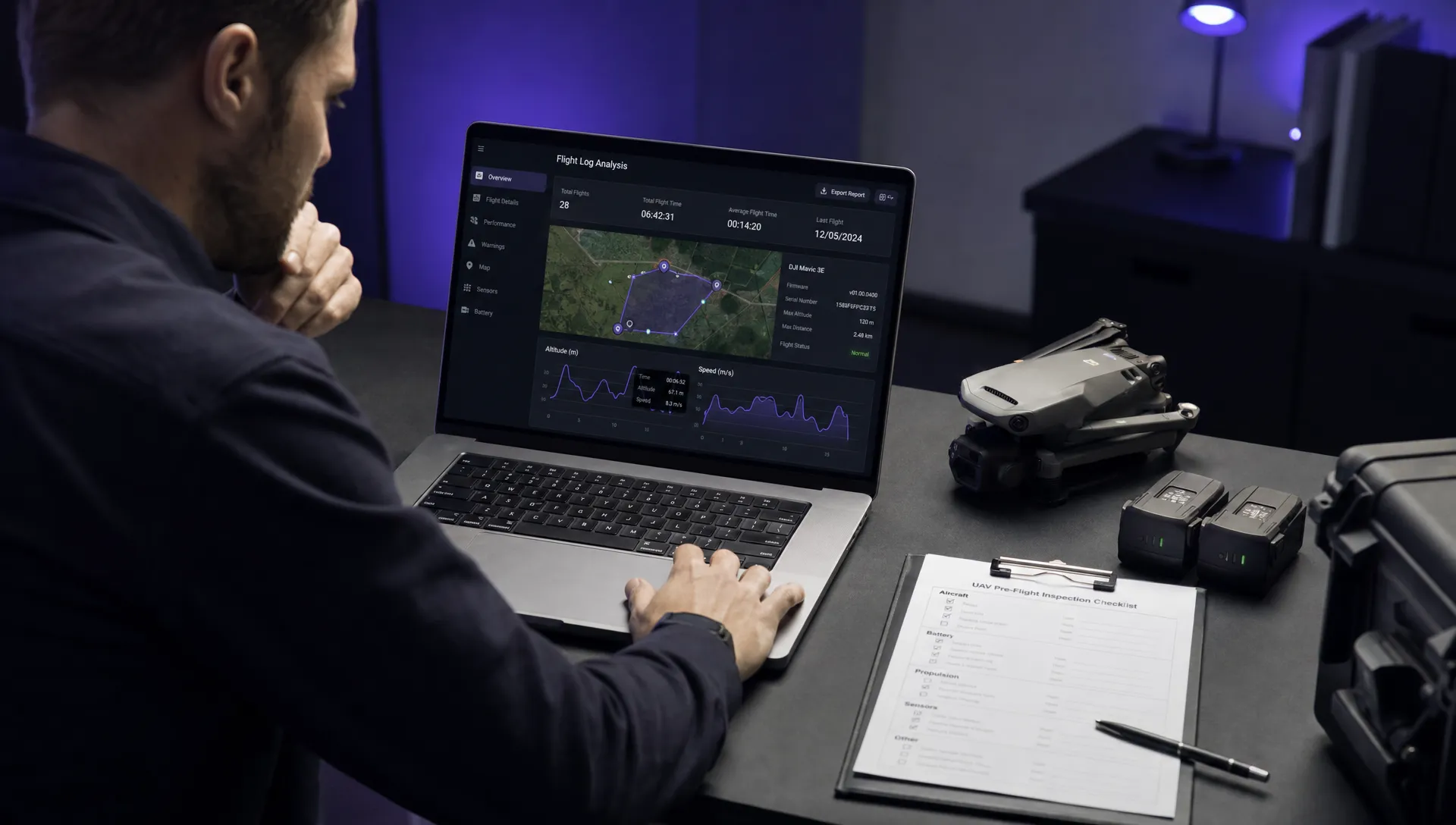
A practical DJI flight log analysis workflow for operational teams
A consistent workflow is more valuable than an occasional deep dive. The point is to make warning review repeatable enough for busy commercial teams, not to turn every flight into a lab exercise.
Start with the original file. Preserve it before exporting screenshots, summaries or converted versions. Record the aircraft, controller, battery serial or asset ID, pilot, site, date, weather notes and mission type. Then load the file into your chosen viewer and mark the warning timestamp.
| Review step | What to check | Output to record |
|---|---|---|
| Confirm the warning | Exact alert wording and timestamp | Event note in the flight record |
| Review context | Altitude, distance, speed, flight mode and manoeuvre | Short explanation of what was happening |
| Inspect battery behaviour | Percentage, voltage trend and cell data where available | Battery status decision |
| Inspect signal behaviour | Link warnings, aircraft position and obstructions | Site or equipment action |
| Compare history | Same pack, aircraft, controller, pilot or site | Pattern or one-off judgement |
| Decide control | Maintenance, procedure change or no action | Close-out note and responsible person |
For higher-risk work, repeat this process after any significant warning, not only after incidents. In many cases, DJI flight log analysis finds weak signals before they become operational failures. A recurring warning in training is much cheaper to fix than the same warning during a utility inspection, blue-light deployment or client-critical survey.
Turning warnings into better planning and safer controls
The value of DJI flight log analysis is only realised when findings change behaviour. A battery warning should influence battery rotation, reserve settings, payload planning or retirement decisions. A signal warning should influence launch points, crew briefing, standoff distances or contingency planning.
Dronedesk brings together features such as flight planning, flight logging, data reporting, configurable checklists and risk assessments, which can help operators keep the post-flight finding connected to the next job. If a warning changes how you understand a site or task, update the relevant checklist or risk assessment rather than leaving the lesson in a separate folder.
If the log review identifies a new hazard, revisit your assessment process. Dronedesk also has a practical guide on building a drone flight risk assessment that works, which is useful when a technical finding needs to become an operational control.
| Finding from log review | Possible control to add |
|---|---|
| Battery sag during high-power climbs | Set a gentler climb profile or higher launch battery threshold |
| Low reserve on return leg | Bring return-to-home forward and shorten mission segments |
| Weak signal behind buildings | Move launch point and brief minimum altitude for link margin |
| Repeated dropout near infrastructure | Increase standoff and add a site-specific abort point |
| Same warning on one aircraft | Quarantine aircraft or controller for inspection |
Common mistakes when interpreting DJI battery and signal warnings
Poor DJI flight log analysis often comes from jumping to a conclusion too early. A red warning in the app feels definitive, but the cause may sit outside the aircraft. Weather, pilot position, payload, terrain and mission design can all create conditions that make normal equipment look unreliable.
Avoid these common errors:
- Treating a single warning as proof of a defective battery or controller
- Ignoring the 60 seconds before the warning, where the cause often appears
- Comparing two missions without considering wind, payload and temperature
- Looking only at battery percentage rather than voltage behaviour
- Confusing video link breakup with complete aircraft control loss
- Failing to compare the same battery across multiple flights
Also avoid overconfidence. If a warning relates to aircraft disconnection, unexpected power behaviour or anything that affected control of the flight, preserve the original logs and follow your organisation's escalation procedure. Where manufacturer or regulator input is required, do not edit or overwrite the source files.
Frequently Asked Questions
Can DJI logs prove why a battery warning happened? Not on their own. Logs can show the timing, telemetry and warning context, but the conclusion should also consider battery age, condition, weather, payload, pilot action and manufacturer guidance.
Which DJI app logs should I review after a warning? Start with the app log from DJI Fly, DJI GO 4 or DJI Pilot 2, depending on the aircraft and controller used. If the event was serious, preserve all available logs and avoid deleting aircraft or controller data.
Is a signal warning always dangerous? No. Some signal warnings are brief and recover immediately, especially when the aircraft passes behind a minor obstruction. Repeated warnings, control link loss or warnings near critical infrastructure deserve a more formal review.
How often should commercial operators review DJI logs? Review logs after any battery, signal, control or navigation warning. Many teams also sample routine flights to identify trends before they affect operations.
Can DJI flight log analysis help with client reporting? Yes, if used carefully. It can support clear internal records and evidence-based explanations, but avoid sharing raw technical conclusions with clients unless they have been checked and approved within your organisation.
Make log review part of your operating rhythm
Battery and signal warnings are not just messages to clear from an app. They are prompts to improve planning, maintenance and crew decision-making. With a repeatable review process, DJI flight log analysis helps operators move from reactive troubleshooting to evidence-led operations.
Use the Dronedesk DJI flight log analysis tool to inspect your next warning, then connect the finding back into your flight planning, logging, checklists and risk assessment process in Dronedesk.
 How to Find and Read the FAA BVLOS ARC Report →
 FAA Drone Registration Rules When Transferring Company Assets →
 Remote Pilot Competency Evidence for Utility Procurement Teams →
 Drone Flight Log Fields to Standardise in Excel Across Teams →
 How to Preserve Original Data With a DJI Flight Log Converter →
 Beyond Visual Line of Sight Drone Operations and Observer Roles →
 How to Troubleshoot a DJI Log Export That Will Not Open →
 Drone Pilot Regulations for Visiting Overseas Contractors →
 Drone Laws Near Airports for Repeat Inspection Contracts →
 FAA Restrictions on Drones During Stadium Events Explained →