
Drone Software Integration Checklist for Growing Teams
Choosing drone software becomes a bigger decision once your operation grows beyond one pilot, one aircraft and a handful of repeat jobs. At that point, the question is not simply which tool has the nicest interface. It is whether your systems can carry work from enquiry to planning, approval, flight, logging and reporting without creating gaps that affect safety, compliance or commercial delivery.
For growing drone teams, integration is less about connecting every app through an API and more about creating one reliable operating model. Survey companies need repeatable site workflows. Utility teams need consistency across distributed assets. Emergency services need fast mobilisation without losing control of authorisations, risk checks and records. This checklist will help you assess the operational, data and people issues before you commit to a platform or rollout plan.
Why a drone software integration checklist matters for growing teams
When a team is small, informal processes can appear to work. A pilot remembers the aircraft history, the operations manager knows which client forms are current and everyone can find the latest risk assessment in a shared folder. Growth breaks that model quickly because more people, aircraft, payloads, sites and clients create more handovers.
The right drone software should reduce ambiguity: who is assigned to the job, which aircraft is available, what hazards were assessed, which checklists were completed and where the flight record is stored. Without that structure, teams often compensate with duplicated spreadsheets, messaging threads and manual file naming conventions that only one person truly understands.
Integration also affects auditability. Whether you operate under UK CAA rules, FAA Part 107 in the United States or EASA rules in Europe, your operational records need to be reliable enough to support internal governance and external scrutiny. Always check the official sources for your jurisdiction, including the UK Civil Aviation Authority drone guidance, the FAA Part 107 overview and EASA drone regulations information.
Start with integration readiness, not the tool demo
Before shortlisting vendors, document how your team actually works today. That means tracing the journey from opportunity intake through to post-flight reporting. Do not sanitise the process. Include the awkward manual steps, the duplicated data entry and the exceptions that happen when work is urgent or weather changes the plan.
At this stage, drone software is a management system as much as a flight planning aid. It needs to support the way your organisation allocates responsibility, controls risk and stores operational evidence. A polished demo can look convincing, but it may not reveal whether the platform fits your approval routes, field conditions or reporting obligations.
| Readiness area | Questions to answer before rollout | Why it matters |
|---|---|---|
| People | Who creates jobs, approves plans, flies missions and reviews records? | Prevents unclear ownership and missed handovers |
| Process | Which steps are mandatory for every job and which vary by client or site? | Helps configure workflows without overcomplicating them |
| Data | Which fields must be consistent across clients, aircraft, pilots and jobs? | Reduces duplication and improves reporting quality |
| Compliance | Which records must be retained and who needs access to them? | Supports internal audits and regulator enquiries |
| Scale | How many pilots, aircraft and sites will the system need to handle next year? | Avoids choosing a tool that only fits the current team size |
Map your operational workflow before choosing tools
A practical integration plan starts with a workflow map. For most commercial teams, that includes client intake, site details, aircraft selection, crew allocation, airspace review, proximity checks, risk assessment, checklist completion, flight logging, data handover and reporting. Some teams will also connect finance, asset maintenance or GIS systems, but those should come after the core operational flow is stable.
A useful drone software rollout should expose where information changes hands. For example, a survey team may receive a site boundary from a client, convert it into a flight area, assign a qualified pilot, capture field notes and then produce a deliverable for the client. If those steps sit in disconnected systems, every handover becomes a chance for delay or error.
Keep your workflow map simple at first. Use columns for stage, owner, input, output, required record and current tool. Once the map is complete, you can identify which steps must sit inside your operations platform and which can remain in specialist tools.
Define compliance and safety data requirements
Compliance requirements vary by jurisdiction, operating category and mission type, so avoid building your integration plan around assumptions. Use official guidance as the baseline and seek competent advice where operations are complex. For higher-risk or specific operations, risk assessment methodology may involve frameworks such as JARUS SORA or the UK SORA material in the CAA regulatory library.htm), depending on the jurisdiction and operation.
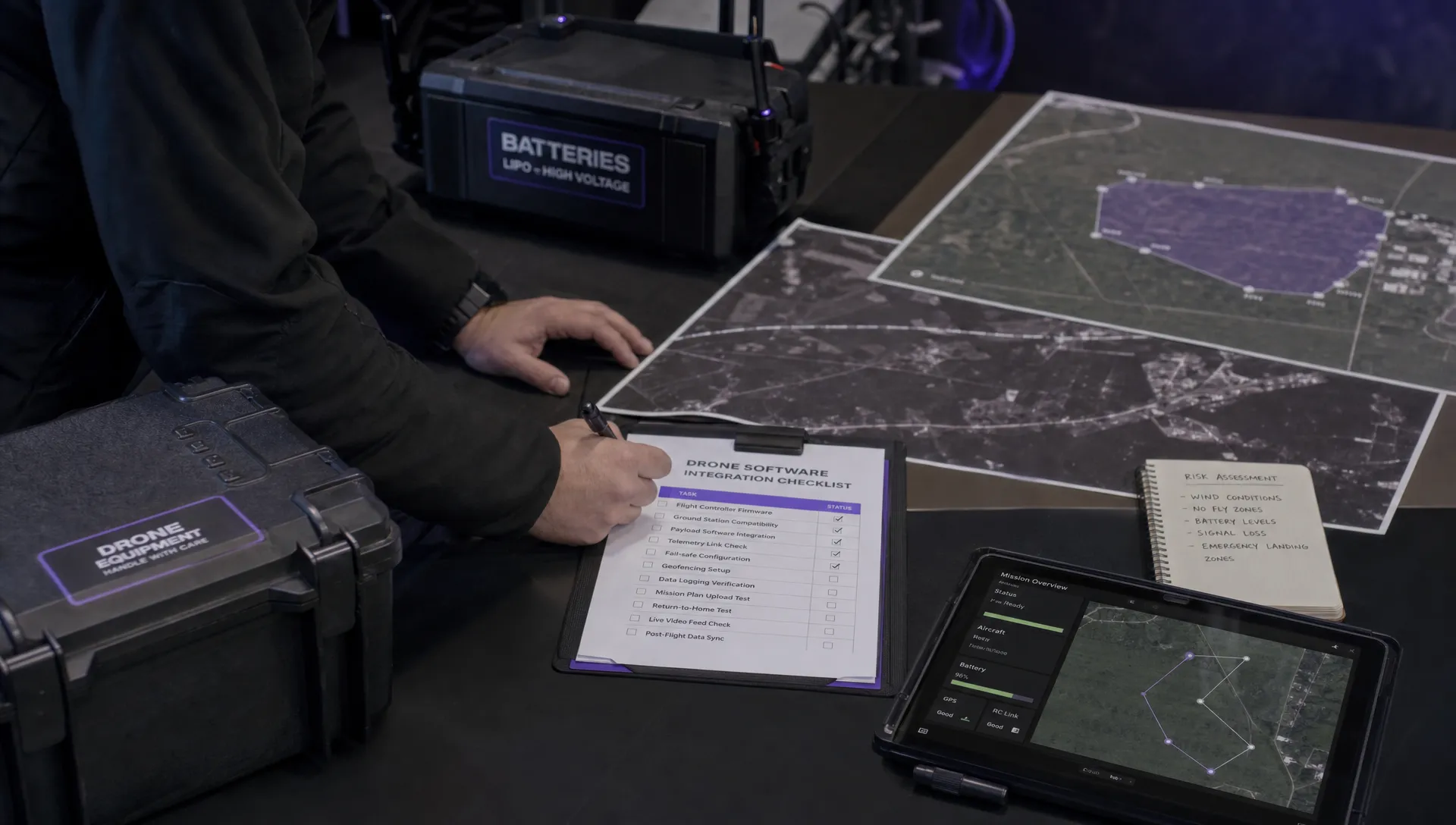
Your drone software should help you keep safety-critical information in a consistent structure. At a minimum, growing teams usually need repeatable risk assessment records, configurable checklists, crew assignments, site notes, airspace context, proximity information and flight logs. The goal is not to generate paperwork for its own sake. It is to ensure the right information is available before a flight and traceable afterwards.
For Dronedesk users, these areas align with the platform's published features, including risk assessments, configurable checklists, airspace intelligence, proximity intelligence, flight planning, flight logging and data reporting. You can review the full set of operational capabilities on the Dronedesk features page.
Audit your fleet, payloads and maintenance data
Fleet growth introduces a different kind of integration challenge. One aircraft can be tracked in a spreadsheet. Ten aircraft with multiple batteries, payloads, firmware states and maintenance histories quickly need a more disciplined structure. This is especially true for utility inspections, public sector teams and survey companies that need to prove equipment suitability for specific jobs.
For growing fleets, drone software should make it clear which aircraft and equipment are available, assigned, grounded or due for attention. It should also help operations managers avoid assigning an aircraft to a job when the payload, pilot qualification or maintenance status does not fit the task.
| Fleet data category | Examples to standardise | Integration value |
|---|---|---|
| Aircraft | Model, serial number, registration or operator reference | Supports allocation and audit trails |
| Payloads | Cameras, sensors, thermal payloads or specialist equipment | Matches equipment capability to job requirements |
| Batteries | Identification, cycle count and condition notes | Improves planning confidence and field readiness |
| Maintenance | Inspection dates, issues and service notes | Reduces the risk of using unsuitable equipment |
| Availability | Assigned jobs, location and operational status | Helps teams plan across multiple crews or regions |
If fleet structure is your biggest constraint, it is worth comparing your current process with a more detailed drone fleet management guide before you finalise your integration plan.
Connect flight planning, logs and post-flight analysis
Flight planning and logging are where operational intent becomes evidence. A well-planned mission should carry enough context into the field for the crew to understand the site, the airspace considerations, the risk controls and the required outputs. After the flight, the log should show what actually happened and feed back into reporting, maintenance and operational review.
When drone software connects planning and logs properly, the team avoids treating each flight as an isolated event. The job record can hold the planned mission, the assigned crew, the relevant checklists, the risk assessment and the completed flight details in one place. That continuity is valuable for internal review, client queries and continuous improvement.
DJI logs can also provide useful post-flight evidence for operations that need deeper review of flight behaviour. If your team works with DJI aircraft, Dronedesk provides a DJI flight log analysis tool that can help inspect flight log data outside the day-to-day planning workflow.
Set up roles, permissions and team handovers
As teams expand, access control becomes more than an IT concern. It shapes how safely and efficiently work moves through the organisation. A pilot should not have to search through unrelated client records to find the assigned job, and an operations manager should not rely on informal messages to confirm that pre-flight checks are complete.
A drone software implementation should define roles before accounts are created. Typical roles might include operations manager, remote pilot, observer, maintenance lead, data processor, account manager and compliance reviewer. The exact names matter less than the responsibilities attached to each one.
Handovers deserve special attention. If a planner prepares a job that another pilot will fly, the operational record should make the status obvious. If a site visit is postponed, the system should preserve the original planning work but make it clear what needs review before the new date. For emergency services, this clarity can be critical because teams may need to mobilise quickly under pressure.
Align client management and reporting workflows
Client data often sits outside the aviation workflow, yet it drives many operational decisions. Site contacts, purchase order references, access instructions, deliverable formats and recurring service requirements can all affect how a mission is planned. If that information lives only in email, the field team may not see it in time.
The best drone software integration plans connect client management with operational delivery. That does not mean every commercial detail must be visible to every pilot. It means job-critical client information should flow into planning, execution and reporting without repeated copy-and-paste work.
Reporting also needs early attention. Survey companies may need project-level summaries. Utilities may need evidence linked to infrastructure assets or regions. Emergency services may need incident records that are clear enough for later review. Define these outputs before rollout, then check whether the platform can structure data in a way that supports them.
Test airspace, site intelligence and field usability
Airspace and proximity checks are central to planning, but growing teams need more than a map layer. They need a consistent process for identifying relevant constraints, recording decisions and communicating field instructions. A system that looks useful in the office may still fail if crews cannot use the information effectively on site.
Your drone software evaluation should include realistic test jobs, not generic demo locations. Use a rural survey site, a congested urban inspection, a utility corridor or a time-sensitive public safety scenario, depending on your work. Check whether the system helps the planner understand the operating environment and whether the field crew receives the information in a usable format.
This is also where proximity intelligence matters. Nearby assets, hazards, infrastructure and sensitive locations can all influence how a mission is prepared. The value comes from putting that context into the same operational record as the risk assessment and flight plan, rather than leaving it in a separate browser tab.
Plan migration, training and change management
A growing team can make the right software choice and still struggle if migration is rushed. Start with a controlled pilot group, a small set of job types and clean data. Importing every old spreadsheet field into a new system may feel thorough, but it often carries bad habits forward.
During migration, drone software should be configured around the future operating model, not just the old filing structure. Decide which legacy records need to be retained, which data needs cleansing and which templates should be rebuilt from scratch. This is the point where operations, compliance and field users need to agree on what good looks like.
| Rollout phase | What to test | Success signal |
|---|---|---|
| Pilot setup | Users, aircraft, templates and sample clients | Core data is clean and understandable |
| Trial jobs | Real missions with normal constraints | Teams can complete work without reverting to spreadsheets |
| Review | Feedback from planners, pilots and managers | Issues are specific enough to fix |
| Wider rollout | More users, regions or service lines | Process remains consistent as volume increases |
| Governance | Data ownership, review cadence and template control | The system stays reliable after launch |
Training should focus on decisions, not button clicks alone. Users need to understand why a field is required, when a risk assessment must be reviewed and how completed records will be used later.
Integration checklist for procurement and rollout
Use this checklist as a practical filter when comparing platforms or preparing implementation. It is deliberately operational rather than technical, because most integration failures start with unclear workflows rather than missing API endpoints.
| Checklist area | Confirm before you commit |
|---|---|
| Operational workflow | The system supports enquiry, planning, flight, logging and reporting without duplicate records |
| Compliance records | Risk assessments, checklists, authorisations and flight logs are traceable and easy to retrieve |
| Team structure | Roles, permissions and handovers match the way your team actually works |
| Fleet control | Aircraft, payloads, batteries and maintenance data can be managed consistently |
| Site intelligence | Airspace and proximity information can be reviewed as part of the planning record |
| Client information | Job-critical client details are available to planners and field teams |
| Reporting | Data can be exported or reported in a form useful to managers, clients and compliance reviewers |
| Scalability | The platform can support more pilots, aircraft, sites and job types without redesigning the process |
| Training | New users can understand both the workflow and the reason behind each required step |
| Governance | Someone owns templates, data quality, user access and periodic process review |
A strong drone software selection process should also include a few negative tests. Ask what happens when weather changes the date, an aircraft becomes unavailable, a pilot is replaced, a client changes the site boundary or a record needs to be retrieved months later. These scenarios reveal whether the system supports real operations or only the happy path.
Red flags to watch for
Some warning signs are obvious, such as poor usability or missing core features. Others only appear when you examine the full operating model. Be cautious if a platform forces every job into the same template, makes it difficult to retrieve completed records or depends on one administrator to keep the whole process moving.
Another red flag is weak data portability. Your operational history is valuable, so you should understand how records can be exported, reported or reviewed if your needs change. The same applies to permissions. If everyone can edit everything, data quality may suffer. If access is too restrictive, field teams may create workarounds outside the system.
Finally, avoid choosing drone software only for the team you have today. Growth often means more aircraft, more pilots, more demanding clients and more formal oversight. The platform should help you standardise without making the operation rigid.
Frequently Asked Questions
What should growing teams look for in drone software? Growing teams should look for connected flight planning, risk assessments, configurable checklists, fleet management, team management, client records, flight logging, reporting and usable airspace or site intelligence. The best fit depends on your operating model, jurisdiction and job types.
Does drone software need to integrate with every existing business system? Not always. Start with the operational systems that affect safety, compliance and delivery. Finance, GIS, CRM or maintenance integrations can be valuable, but they should not distract from getting planning, flight records and accountability right first.
How often should a drone operations workflow be reviewed? Review it whenever regulations change, the team grows, new aircraft are added, clients demand different records or incidents and near misses reveal a process weakness. Many teams also benefit from a scheduled periodic review of templates, permissions and data quality.
Can one platform support survey, utility and emergency service workflows? It can, if the platform is configurable enough to support different job types, records and team structures. The key is testing real scenarios from each operational area before committing to a full rollout.
Build a cleaner operating model with Dronedesk
If your team is outgrowing spreadsheets, shared folders and disconnected planning tools, Dronedesk brings core drone operations management into one web platform. Its published features include client management, fleet management, team management, airspace intelligence, proximity intelligence, flight planning, flight logging, data reporting, configurable checklists and risk assessments.
Explore how Dronedesk can support a more joined-up operating model at dronedesk.io, or review the platform capabilities in detail on the Dronedesk features page.
 Drone Regulations Under 250 Grams for Mixed-Weight Fleets →
 Drone Safety Guidelines for Working Near Water →
 FAA Rules and Regulations for Drones on Shared Worksites →
 Drone Pilot 107 Refresher Training After a Career Break →
 How to Track Drone Regulations Worldwide as a Business →
 FAA Rules for Flying Drones at Night During Emergency Missions →
 How to Onboard an FAA 107 Pilot for Utility Inspections →
 FAA Drone Rules for Commercial Use on Construction Sites →
 When Should You Retire a Commercial Drone? →
 Drone Fleet Management Software - The Platforms That Failed, and the Ones Still Flying →